AI Image Maker: Turn Any Idea Into Stunning Visuals in Seconds
Creating high-quality images used to mean hiring a designer, learning complex software, or spending hours on manual edits. That is no longer the case. The AI Image Maker transforms any text description into a stunning, high-resolution visual in seconds — completely free, no watermarks, and no login required to get started.
What Is an AI Image Maker?
An AI image maker is a browser-based creative tool that uses advanced machine learning to convert text prompts or uploaded images into polished, professional-grade visuals. It is built for designers, marketers, educators, e-commerce sellers, and anyone who needs compelling imagery without the cost or complexity of traditional design workflows.
Two core input modes power the platform. With Text to Image, users type a descriptive prompt — anything from “photorealistic architectural rendering of a modern villa at sunset” to “playful cartoon character in a Ghibli art style” — and the AI generates a corresponding visual instantly.
With Image to Image, users upload an existing photo or illustration and the AI transforms it according to a new prompt or style direction. This makes it straightforward to restyle product photos, reimagine artwork, or apply entirely new aesthetics to existing visual assets.
Unlike many AI image tools that lock results behind subscriptions or stamp outputs with branding, this free AI image maker delivers clean, watermark-free images with no credit card or account required to begin. Users visit the page and start creating immediately.
Core Features of the AI Image Maker
AI Image Maker with Multi-Model Support
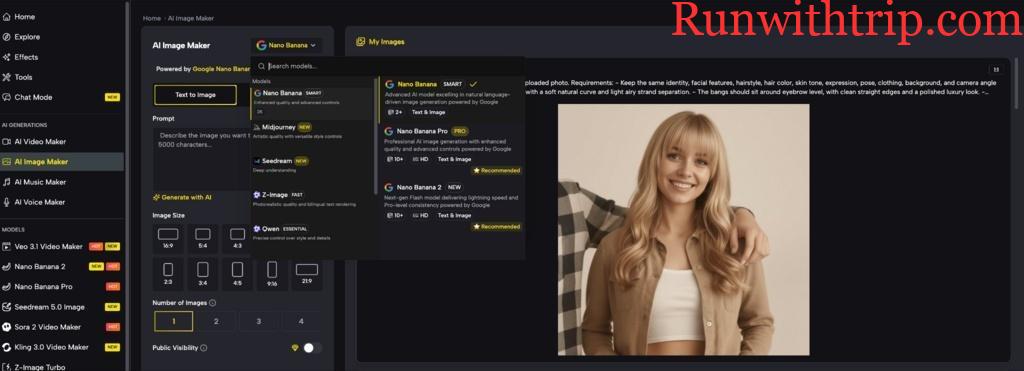
The platform integrates a wide range of leading AI image models including Nano Banana 2, Nano Banana Pro, Seedream 5.0, Flux 2 Klein, Imagen 4 Ultra, GPT Image 1.5, Gemini 3 Pro Image, GLM-Image, Niji V7, Reve v1.1, and more. Each model has distinct strengths — some excel at photorealistic output, others at illustration, anime, concept art, or typographic imagery. Users can select the model best suited to their specific creative goal rather than being locked into a single engine.
Flexible Aspect Ratios and Output Customization
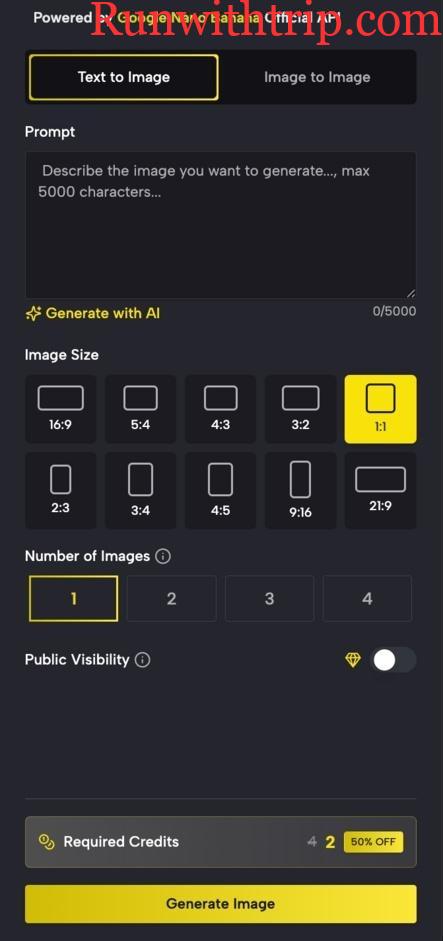
Images can be generated across a full range of aspect ratios including 16:9, 5:4, 4:3, 3:2, 1:1, 2:3, 3:4, 4:5, 9:16, and 21:9. Users can also specify the number of images generated per prompt — from one to four — giving them multiple variations to choose from in a single session. This flexibility makes the tool equally suited for landscape headers, square social posts, vertical mobile content, and widescreen cinematic formats.
One-Click Stylistic Effects
For creators who want to apply a specific visual aesthetic without crafting detailed prompts, the AI image maker offers one-click stylistic transformation. Popular styles including Ghibli, Minecraft, cinematic, and illustrative looks can be applied instantly, making professional-grade art direction accessible regardless of technical experience.
AI Image Maker Editing Tools: Magic Erase and Smart Uncrop
Beyond generation, the platform includes a full suite of editing capabilities. Magic Erase allows users to remove unwanted objects from any image seamlessly. Smart Uncrop and Outpainting intelligently expand the canvas beyond the original image boundaries, adding context and environment without visible seams. These tools transform the AI image maker from a generator into a complete image editing environment.
Photo Restoration and Image to Video Conversion
Two additional capabilities extend the platform’s usefulness significantly. Photo Restoration uses AI to rejuvenate old, faded, or damaged photographs — recovering detail and color that would otherwise be lost. Image to Video conversion takes any generated or uploaded image and animates it into a dynamic video clip, creating motion content directly from still imagery without any additional tools.
How the AI Image Maker Four-Step Workflow Works
Step One — Add Your Input to the AI Image Maker
Choose between Text to Image or Image to Image. For text prompts, descriptive and specific language produces the best results — including details about style, lighting, mood, color palette, and subject matter.
Step Two — Customize Your AI Image Maker Options
Set the aspect ratio, select the number of output images, choose a model, and apply any stylistic effects. These options give users precise control over the format and aesthetic of the output before generation begins.
Step Three — Generate and Review
Click Generate and the AI image maker produces results within seconds. Multiple output variations allow users to compare and select the best result, or use multiple versions for different platforms and contexts.
Step Four — Export, Share, or Transform
Download the final image in high resolution, integrate it into other projects, apply further editing with in-platform tools, or convert it directly into a video clip. All generate images are automatically save to a secure cloud library for easy access and future remixing.
Specialized AI Image Maker Tools
Beyond the core generator, the AI image maker hosts an extensive library of specialized tools covering a wide range of specific creative needs.
AI Image Maker for Portraits and Faces
A dedicated set of face-focused tools includes an AI Portrait Generator, AI Gender Change Filter, AI Caricature Maker, AI Lip Filler, No Beard Filter, and AI Virtual Try On Glasses. Each tool applies targeted AI transformation to portrait photos, producing results that are immediately shareable on social media or usable in creative projects.
AI Image Maker for Style Transformation
For creators who want to apply specific visual styles to existing images, the platform offers Photo to Anime, Photo to Cartoon, Photo to Sketch, Cartoon to Realistic AI Generator, AI Cinematic Photo Filter, and AI Art Image Generator. These tools make it fast to reimagine any image in a completely different artistic style with a single upload and click.
AI Image Maker for Design and Commercial Use
Practical design tools include an AI Mockup Generator, AI Wallpaper Generator, AI Signature Generator, 3D Text Generator, AI Image Expander, AI Image Resizer, Add Text to Image, Remove Object from Photo, AI Color Changer, and Silhouette Maker. These capabilities serve designers, marketers, and e-commerce professionals who need production-ready assets quickly.
Who the AI Image Maker Is Built For
AI Image Maker for Architects and Designers
The platform converts abstract concepts into photorealistic architectural renderings and design visualizations in seconds. Iterating on design concepts that once took hours of rendering time becomes a matter of seconds, allowing designers to present more options to clients and respond to feedback immediately.
AI Image Maker for E-Commerce Professionals
Product imagery is one of the highest-impact variables in e-commerce conversion rates. The AI image maker allows sellers to showcase products in diverse settings, generate lifestyle photography without expensive shoots, and remove or replace backgrounds instantly — all without leaving the browser.
AI Image Maker for Content Publishers and Social Media Creators
Custom visuals that match a specific brand voice and editorial tone are now generatable in minutes rather than commissioned over days. Content publishers report up to 40% increases in article engagement and social media shares when pairing text content with custom AI-generated imagery.
AI Image Maker for Educators and Event Planners
Educators use the platform to create custom illustrations that make lessons more visual and interactive. Event planners use it to produce thematic promotional materials, preview decoration concepts, and generate invitation designs — all in a fraction of the time traditional design workflows require.
Conclusion
An AI image maker has moved from novelty to essential creative infrastructure for designers, marketers, content creators, and businesses of all sizes. The combination of multi-model generation, flexible customization, specialized tools for every use case, and a zero-friction free entry point makes this platform one of the most capable and accessible options available today.
Whether you are generating concept art, producing e-commerce product images, creating social media visuals, or restoring old photographs, the right AI Image Maker delivers professional results in seconds — no design experience required.